
How to Sell Merchandise Using Ticket Options
Selling merchandise through ticket creation allows products to be offered as selectable ticket options within your event. Customers can view and purchase merch at the same time as securing their tickets, improving visibility, simplifying the buying process, and increasing additional sales.
Follow the steps below to customise your tickets:
1) Create a new event or edit an existing one.
2) On the edit event page, scroll to the Tickets section and create a new ticket or select an existing one you want to modify.
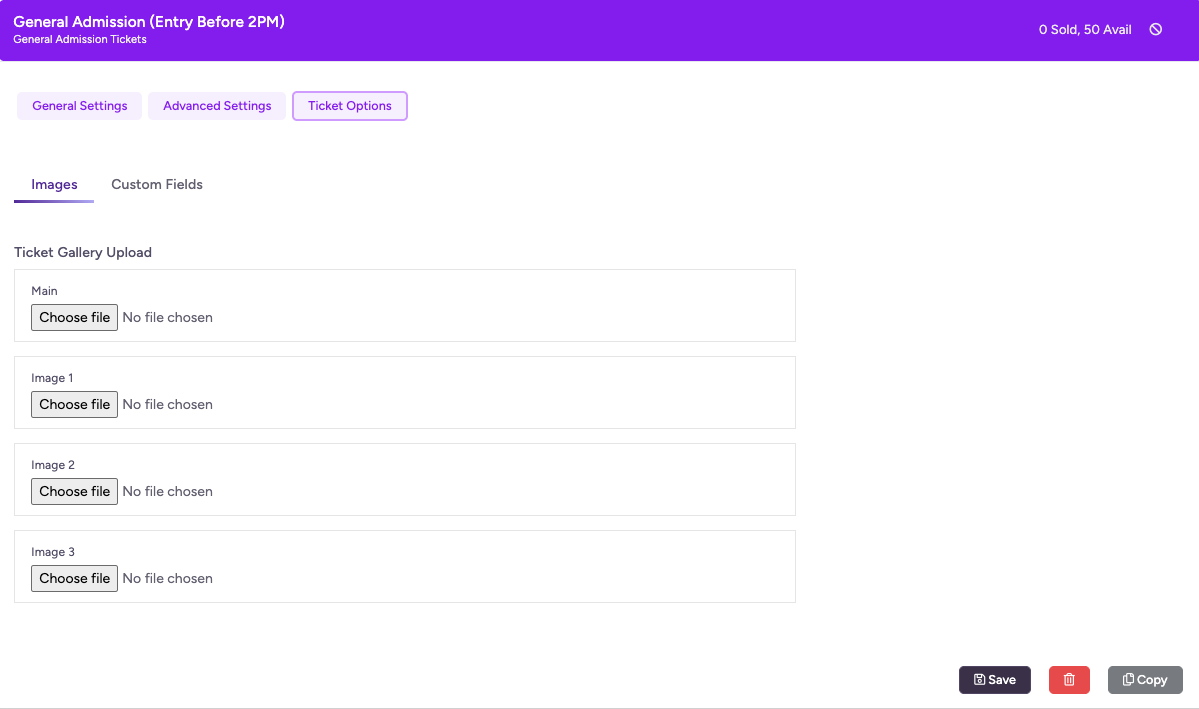
3) Once the ticket has been created, click on save before navigating to the Ticket Options tab to access additional customisation settings.
4) Under the Images tab, upload a main image for primary display, then add any additional images to showcase your ticket or merchandise.
5) Switch to the Custom Fields tab and click on Add Field to collect extra information such as sizes, colours, or preferences. If the item requires delivery, enable the Require shipping address option.
6) Click Save, then preview your event page to ensure everything is displayed correctly.
Last updated: 6 months ago
Published: 19th Mar, 2026